故障现象
最近3D打印机自带的显示屏非常暗淡,USB插上电脑之后,屏幕恢复正常亮度。使用万用表测试供电引脚,发现开关电源输出的电压在 7~9V 之间波动。这个电源的输出电压是 18V 的,当前只输出这么低的电压,明显是有问题的。
问题分析
电源能正常输出电压,并能勉强维持系统正常运行,说明电源的转换电路工作是正常的,那么电源的前极部分应该是正常工作的,否则后端不应该有电压产生。那么问题大概率就是电源后极的部分的问题。这种现象产生的原因大概率与电源的可调电阻有关系。
最近3D打印机自带的显示屏非常暗淡,USB插上电脑之后,屏幕恢复正常亮度。使用万用表测试供电引脚,发现开关电源输出的电压在 7~9V 之间波动。这个电源的输出电压是 18V 的,当前只输出这么低的电压,明显是有问题的。
电源能正常输出电压,并能勉强维持系统正常运行,说明电源的转换电路工作是正常的,那么电源的前极部分应该是正常工作的,否则后端不应该有电压产生。那么问题大概率就是电源后极的部分的问题。这种现象产生的原因大概率与电源的可调电阻有关系。
VirtualBox的虚拟机在操作时,需要点击菜单栏和任务栏,但有时候我们会出现无法显示的问题。
“ 使用Allegro的小伙伴应该很清楚Courtyard层的用法,但使用Altium Designer的小伙伴可能对Courtyard层完全没有概念。Courtyard层到底是什么?在KiCad中如何使用?”。
或者执行“封装检查”报错“没有定义外框”英文 “Footprint has no courtyard defined”,那这个报错的含义是什么?

Courtyard是指装配或其他功能所需的物理元件周围的区域。该区域内不应放置其他元件。如果元件之间的距离太近,组装可能会很困难或是不可能。
在讨论装配时,需要的区域取决于装配方式(自动或手动)以及其他可能的细节。没有一个绝对正确的区域、形状或Courtyard的尺寸可以保证无问题的装配,同时又是最优的(小)尺寸,可以密集的放置。需要在“方便装配”与“装配区域尽可能小”之间取得妥协。
作为一个粗略的指导,KiCad可以检查组件是否太靠近,即检查Courtyard的碰撞情况,也就是检查重叠的Courtyard区域。Courtyard区域必须是一个封闭的形状。该形状以图形方式绘制在F.Courtyard或B.Courtyard层上。要求与Edge.Cuts 板框层完全相同:每条线必须在下一条开始的地方结束,它们不能交叉,最后一条必须在第一条开始的地方结束。除了这个封闭的形状之外,该层的封装中不能有其他东西。
Courtyard通常用一个长方形表示。
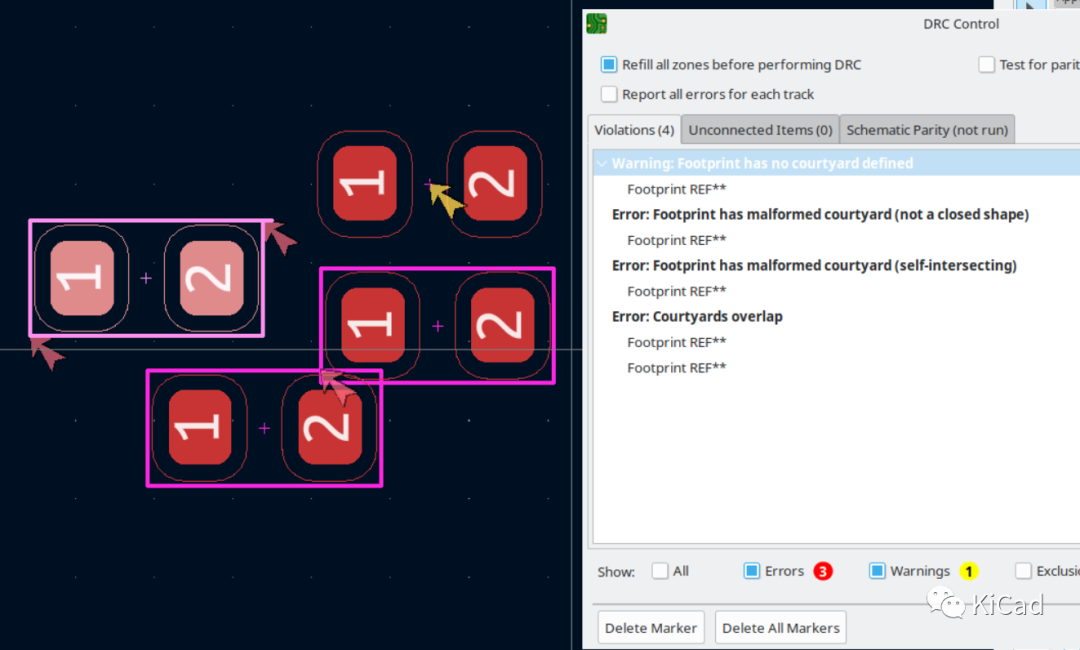
如果一个绘制Courtyard时不遵守这些规则,或者Courtyard存在其他问题,DRC会报错:


第一个错误表示Courtyard图形不封闭;第二个错误表示Courtyard自相交;第三个错误表示两个元件的Courtyard重叠。
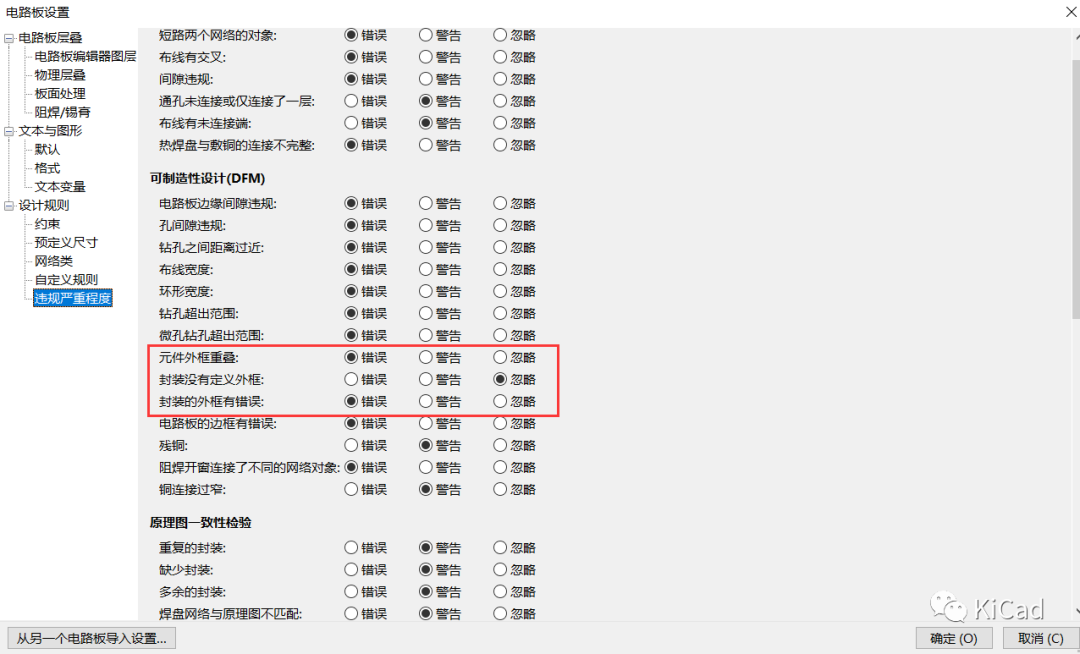
违规的严重度可以在“电路板设置”中更改:

如果你设计或修改你自己的封装,由于没有任何硬性规定可以遵循,你可以画一个“足够好”的Courtyard来满足你的目的。如果你想对此进行优化,则需要知道装配过程的限制以及该元件与周围部件之间的相互作用。例如:想象一个很高的元件和一个很矮的元件并排放在一起:高的可能很容易放置,但高的放置完成后,再装配矮的元件可能会有问题,即使Courtyard本身估计足够大。
需要在元件周围留出足够的制造空间。如果需要更严格的设计,需要根据具体情况决定一些Courtyard是否可以与其他Courtyard重叠。DRC中两个组件之间的违规行为可以被排除或忽略。
请注意,虽然从逻辑上讲,在有理想Courtyard的理想情况下,每个元件只需要其周围由自己的Courtyard形成的空间,但重叠的Courtyard是允许的。DRC会检查这种重叠。然而,尽管可以允许两个元件的Courtyard重叠,但这种重叠应该排除一个元件的焊盘,或者元件轮廓(通常是在Fab层上绘制),与另一个元件的Courtyard重叠的情况。
在现实世界中,现代的自动装配过程可以做到相当密集的元件放置。例如,对于0402元件,铜的间隙限制了放置,而不是KiCad官方封装所建议的Courtyard。
在 macOS 中,给 PKG 文件进行签名是一个确保用户能够顺利无警告地安装软件的重要步骤。以下是给 PKG 签名的详细步骤:
使用 productsign 命令对 PKG 文件进行签名。命令格式如下:
|
1 |
$ productsign --sign "Developer ID Installer: 开发者名称 (证书标识符)" 原始PKG文件路径 签名后的PKG文件路径 |
例如:
|
1 |
$ productsign --sign "Developer ID Installer: Your Company, Co., LTD (2988ZTAM4B)" App.pkg App-Signed.pkg |
这将生成一个新的签名后的 PKG 文件。
使用 pkgutil 命令验证 PKG 文件的签名是否有效。命令格式如下:
|
1 |
$ pkgutil --check-signature 签名后的PKG文件路径 |
如果签名有效,命令将输出 “signed by a developer certificate issued by Apple for distribution”。
从 macOS 10.14.5 开始,苹果要求所有分发的软件都必须经过公证(Notarization)。公证过程如下:
在公证之前,你需要确保你的 .pkg 文件已经使用 codesign 命令进行了签名。
|
1 2 3 4 |
$ xcrun notarytool store-credentials "$KEYCHAIN_PROFILE" \ --apple-id "$APPLE_ID" \ --team-id "$TEAM_ID" \ --password "$APP_SPECIFIC_PASSWORD" |
使用 notarytool 提交你的软件包进行公证。这一步会将你的软件包上传到 Apple 的公证服务,并启动公证流程。
|
1 |
$ xcrun notarytool submit $ /path/to/your/signed/package.pkg --keychain-profile $KEYCHAIN_PROFILE --wait |
如果公证成功,notarytool 会返回一个 RequestUUID,你可以使用这个 UUID 来查询公证状态或进行后续操作。
检查公证结果(如果未使用 --wait):
如果你没有使用 --wait 参数,你需要使用返回的 RequestUUID 来检查公证状态。
|
1 |
$ xcrun notarytool status <RequestUUID> |
替换 <RequestUUID> 为你实际获得的 UUID。
一旦你的软件包通过了公证,你就可以使用 stapler 工具对其进行盖章。
使用 stapler 工具对你的软件包进行盖章,以表明它已经通过了 Apple 的公证服务。
|
1 |
$ xcrun stapler staple /path/to/your/signed/package.pkg |
/path/to/your/signed/package.pkg 是你的已签名且已公证的软件包的路径。
你可以使用 stapler 工具来验证你的软件包是否已经被正确盖章。
|
1 |
$ xcrun stapler validate /path/to/your/stapled/package.pkg |
/path/to/your/stapled/package.pkg 是你的已盖章软件包的路径。
如果所有步骤都成功完成,你的软件包现在应该已经准备好分发给用户了。
用户可以通过 macOS 的“安装未知开发者应用”的安全设置来安装你的软件包,而不会因为未经验证的应用程序而被阻止。
以下是一个简要的流程,以及一个相应的 .sh 脚本示例:
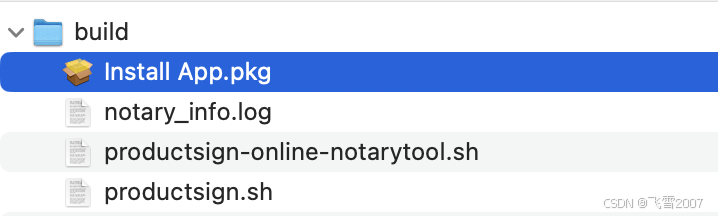
1.用于签名 .pkg 文件( productsign.sh )。
|
1 2 3 4 5 6 7 8 9 10 11 12 13 14 15 16 17 18 19 20 21 22 23 24 25 26 27 28 29 |
#!/bin/bash # 证书名称,使用"security find-identity -v"命令查找并替换 CERT_NAME="Developer ID Installer: Your Company Co., Ltd. (4H8C8HR626)" # 原始PKG文件路径,替换为你的PKG文件路径 PKG_PATH="Install App.pkg" # 签名后的PKG文件路径,替换为你想要保存的签名PKG文件路径 SIGNED_PKG_PATH="../Install App.pkg" # 签名PKG文件 echo "正在签名PKG文件..." productsign --sign "$CERT_NAME" "$PKG_PATH" "$SIGNED_PKG_PATH" if [ $? -ne 0 ]; then echo "签名PKG文件失败" exit 1 fi echo "PKG文件签名成功" # 验证签名 echo "正在验证PKG文件签名..." pkgutil --check-signature "$SIGNED_PKG_PATH" if [ $? -ne 0 ]; then echo "验证PKG文件签名失败" exit 1 fi echo "PKG文件签名验证成功" echo "所有脚本执行成功!" |
2.用于签名和公证 .pkg 文件(productsign-online-notarytool.sh)。
|
1 2 3 4 5 6 7 8 9 10 11 12 13 14 15 16 17 18 19 20 21 22 23 24 25 26 27 28 29 30 31 32 33 34 35 36 37 38 39 40 41 42 43 44 45 46 47 48 49 50 51 52 53 54 55 56 57 58 59 60 61 62 63 64 65 66 67 68 69 70 71 72 73 74 75 76 77 78 79 80 81 82 83 84 85 86 87 88 89 90 91 92 93 94 95 96 97 98 99 100 101 102 103 104 105 106 107 108 109 110 111 112 113 114 115 116 117 118 119 120 121 122 123 124 125 126 127 128 129 130 |
#!/bin/bash # 证书名称,使用"security find-identity -v"命令查找并替换 CERT_NAME="Developer ID Installer: Your Company Co., Ltd. (4H8C8HR626)" # 开发者团队ID # 从CERT_NAME中提取TEAM_ID # 假设TEAM_ID总是位于最后一对括号内 # TEAM_ID="4H8C8HR626" TEAM_ID=$(echo "$CERT_NAME" | awk -F'[()]' '{print $2}') # 原始PKG文件路径,替换为你的PKG文件路径 PKG_PATH="Install App.pkg" # 签名后的PKG文件路径,替换为你想要保存的签名PKG文件路径 SIGNED_PKG_PATH="../Install App.pkg" # 苹果开发者账号 APPLE_ID="apple@163.com" # 应用专属密码(不是账号的登录密码),替换为你的应用专属密码 # 申请链接:https://account.apple.com/account/manage APP_SPECIFIC_PASSWORD="wet-erwc-ssdf-hqaf" KEYCHAIN_PROFILE="my_notary_credentials" # 钥匙串配置文件名称 # 签名PKG文件 echo "正在签名PKG文件..." productsign --sign "$CERT_NAME" "$PKG_PATH" "$SIGNED_PKG_PATH" if [ $? -ne 0 ]; then echo "签名PKG文件失败" exit 1 fi echo "PKG文件签名成功" # 验证签名 echo "正在验证PKG文件签名..." pkgutil --check-signature "$SIGNED_PKG_PATH" if [ $? -ne 0 ]; then echo "验证PKG文件签名失败" exit 1 fi echo "PKG文件签名验证成功" # ==== Xcode 16 === # 存储公证凭证到钥匙串 echo "正在存储公证凭证..." xcrun notarytool store-credentials "$KEYCHAIN_PROFILE" \ --apple-id "$APPLE_ID" \ --team-id "$TEAM_ID" \ --password "$APP_SPECIFIC_PASSWORD" if [ $? -ne 0 ]; then echo "存储凭证失败!" exit 1 fi # 上传PKG文件进行公证并获取RequestUUID echo "正在上传PKG文件进行公证, 请稍等..." OUTPUT=$(xcrun notarytool submit "$SIGNED_PKG_PATH" \ --keychain-profile "$KEYCHAIN_PROFILE" \ --wait 2>&1) echo "上传输出信息:" echo "$OUTPUT" # 检查是否成功获取到RequestUUID REQUEST_UUID=$(echo "$OUTPUT" | awk -F': ' '/id: / {print $2; exit}') if [ -z "$REQUEST_UUID" ]; then echo "上传PKG文件进行公证失败,未获取到RequestUUID" echo "错误信息: $OUTPUT" exit 1 fi echo "PKG文件已上传进行公证,RequestUUID: $REQUEST_UUID" # 查询公证进度 echo "正在等待公证完成..." WAIT_TIME=0 INTERVAL=30 MAX_WAIT_TIME=600 # 10分钟=600秒 while [ $WAIT_TIME -lt $MAX_WAIT_TIME ]; do xcrun notarytool info "$REQUEST_UUID" --keychain-profile "$KEYCHAIN_PROFILE" > ./notary_info.log STATUS=$(grep -i "status:" ./notary_info.log | awk -F': ' '{print $2}') if [ "$STATUS" == "Accepted" ]; then echo "公证完成!" break elif [ "$STATUS" == "Success" ]; then echo "公证成功!" break elif [ "$STATUS" == "Invalid" ]; then echo "公证失败,状态为无效!" exit 1 else echo "公证进行中($WAIT_TIME)..." echo "等待$INTERVAL 秒后再次检查..." sleep $INTERVAL WAIT_TIME=$((WAIT_TIME + INTERVAL)) fi if [ $WAIT_TIME -ge $MAX_WAIT_TIME ]; then echo "公证超时!" exit 1 fi done # 盖章 echo "正在对签名的安装包进行盖章..." xcrun stapler staple "$SIGNED_PKG_PATH" if [ $? -ne 0 ]; then echo "盖章失败!" else echo "盖章成功!" exit 1 fi # 验证 echo "正在验证已经盖章的签名的安装包..." xcrun stapler staple -v "$SIGNED_PKG_PATH" if [ $? -ne 0 ]; then echo "验证失败!" exit 1 else echo "盖章和验证成功!" fi echo "PKG文件签名和公证流程全部完成" echo "所有脚本执行成功!" |
请注意,这些步骤假设你已经具备了必要的 Apple Developer 账户、证书和配置文件,并且你的 macOS 系统已经安装了 Xcode 和 Xcode Command Line Tools。如果你遇到任何问题,请检查你的证书、配置文件和路径是否正确,以及你是否拥有执行这些命令的适当权限。
|
1 2 3 4 5 6 7 8 9 |
$ cd build $ chmod +x productsign.sh $ chmod +x productsign-online-notarytool.sh $ ./productsign.sh #或者仅签名 $ ./productsign-online-notarytool.sh # 或者签名加公正[用于需要自动更新] |

系统稳定性差,长时间运行之后出现不稳定现象,尤其是远程桌面 RDP,经常出现无法连接的情况。内存 CPU占用都不高,但是系统反应感觉非常卡顿。
执行 sudo dmesg 函数之后,可以观察到如下报错信息:
|
1 2 3 4 5 6 7 8 9 10 11 12 13 14 15 16 17 18 19 20 21 22 23 24 25 26 27 28 29 30 31 32 33 34 35 36 37 38 39 40 41 42 43 44 45 46 47 48 49 50 51 52 53 54 55 56 57 58 59 60 61 62 63 64 65 66 67 68 69 70 71 72 73 74 75 76 77 78 79 80 81 82 83 84 85 86 87 88 89 90 91 92 93 94 95 96 97 98 99 100 101 102 103 |
[ 97.194200] DMAR: ERROR: DMA PTE for vPFN 0xf1f7f already set (to f1f7f003 not 17039b003) [ 97.194215] ------------[ cut here ]------------ [ 97.194217] WARNING: CPU: 6 PID: 3630 at drivers/iommu/intel/iommu.c:2210 __domain_mapping+0x2c5/0x320 [ 97.194222] Modules linked in: snd_seq_dummy snd_hrtimer snd_seq_midi snd_seq_midi_event snd_rawmidi snd_seq snd_seq_device snd_timer snd soundcore qrtr overlay zram binfmt_misc nls_iso8859_1 ipmi_ssif intel_rapl_msr intel_rapl_common x86_pkg_temp_thermal intel_powerclamp coretemp kvm_intel kvm irqbypass crct10dif_pclmul polyval_clmulni polyval_generic ghash_clmulni_intel gpio_ich sha256_ssse3 sha1_ssse3 aesni_intel input_leds crypto_simd joydev cryptd rapl intel_cstate acpi_power_meter serio_raw mgag200 lpc_ich hpilo acpi_ipmi ipmi_si ipmi_devintf i2c_algo_bit ipmi_msghandler ie31200_edac mac_hid sch_fq_codel msr parport_pc ppdev lp parport efi_pstore nfnetlink dmi_sysfs ip_tables x_tables autofs4 btrfs blake2b_generic raid10 raid456 async_raid6_recov async_memcpy async_pq async_xor async_tx xor raid6_pq libcrc32c raid0 hid_generic usbhid hid raid1 crc32_pclmul psmouse tg3 xhci_pci xhci_pci_renesas pata_acpi uas usb_storage [ 97.194309] CPU: 6 PID: 3630 Comm: upowerd Tainted: G W I 6.8.0-40-generic #40-Ubuntu [ 97.194313] Hardware name: HP ProLiant MicroServer Gen8, BIOS J06 04/04/2019 [ 97.194315] RIP: 0010:__domain_mapping+0x2c5/0x320 [ 97.194319] Code: b0 48 c7 c7 c0 ec cd 95 e8 58 5c 64 ff 8b 05 26 cb bb 01 4c 8b 4d b0 41 bb 00 00 00 00 85 c0 74 09 83 e8 01 89 05 0f cb bb 01 <0f> 0b e9 f9 fe ff ff 41 80 e5 7f e9 da fe ff ff ba 01 00 00 00 e9 [ 97.194322] RSP: 0018:ffffa0d18b1b6dc0 EFLAGS: 00010046 [ 97.194325] RAX: 0000000000000000 RBX: ffff9498c473ebf8 RCX: 0000000000000000 [ 97.194328] RDX: 0000000000000000 RSI: 0000000000000000 RDI: 0000000000000000 [ 97.194330] RBP: ffffa0d18b1b6e20 R08: 0000000000000000 R09: ffff9498c473ebf8 [ 97.194332] R10: 0000000000000000 R11: 0000000000000000 R12: 0000000000000001 [ 97.194334] R13: 000000017039b003 R14: ffff9498c1949100 R15: 0000000000000001 [ 97.194336] FS: 0000000000000000(0000) GS:ffff949bb9d00000(0000) knlGS:0000000000000000 [ 97.194339] CS: 0010 DS: 0000 ES: 0000 CR0: 0000000080050033 [ 97.194342] CR2: 000077c061890008 CR3: 000000016333e006 CR4: 00000000001706f0 [ 97.194344] Call Trace: [ 97.194346] <TASK> [ 97.194348] ? show_regs+0x6d/0x80 [ 97.194351] ? __warn+0x89/0x160 [ 97.194356] ? __domain_mapping+0x2c5/0x320 [ 97.194360] ? report_bug+0x17e/0x1b0 [ 97.194364] ? handle_bug+0x51/0xa0 [ 97.194368] ? exc_invalid_op+0x18/0x80 [ 97.194372] ? asm_exc_invalid_op+0x1b/0x20 [ 97.194378] ? __domain_mapping+0x2c5/0x320 [ 97.194383] intel_iommu_map_pages+0xe1/0x140 [ 97.194388] __iommu_map+0x121/0x280 [ 97.194392] iommu_map_sg+0xbf/0x1f0 [ 97.194397] iommu_dma_map_sg+0x463/0x4f0 [ 97.194403] ? __pfx_ata_scsi_rw_xlat+0x10/0x10 [ 97.194408] __dma_map_sg_attrs+0x35/0xd0 [ 97.194411] dma_map_sg_attrs+0xe/0x30 [ 97.194415] ata_qc_issue+0xfc/0x2d0 [ 97.194419] ? __pfx_ata_scsi_rw_xlat+0x10/0x10 [ 97.194423] ? __pfx_ata_scsi_rw_xlat+0x10/0x10 [ 97.194427] __ata_scsi_queuecmd+0xf2/0x3a0 [ 97.194430] ata_scsi_queuecmd+0x44/0x80 [ 97.194434] scsi_dispatch_cmd+0x91/0x240 [ 97.194437] scsi_queue_rq+0x2c4/0x670 [ 97.194441] blk_mq_dispatch_rq_list+0x137/0x520 [ 97.194445] ? sbitmap_get+0x73/0x180 [ 97.194451] __blk_mq_do_dispatch_sched+0xbb/0x300 [ 97.194455] ? finish_task_switch.isra.0+0x93/0x300 [ 97.194460] __blk_mq_sched_dispatch_requests+0x151/0x190 [ 97.194464] blk_mq_sched_dispatch_requests+0x2c/0x70 [ 97.194467] blk_mq_run_hw_queue+0x1bf/0x210 [ 97.194472] blk_mq_get_tag+0x1ef/0x2f0 [ 97.194476] ? __pfx_autoremove_wake_function+0x10/0x10 [ 97.194481] __blk_mq_alloc_requests+0xd6/0x290 [ 97.194485] blk_mq_submit_bio+0x190/0x6b0 [ 97.194489] __submit_bio+0xb3/0x1c0 [ 97.194492] submit_bio_noacct_nocheck+0x13c/0x1f0 [ 97.194495] submit_bio_noacct+0x162/0x5b0 [ 97.194499] submit_bio+0xb2/0x110 [ 97.194502] ext4_mpage_readpages+0x37e/0xaa0 [ 97.194505] ? __mod_memcg_lruvec_state+0xd6/0x1a0 [ 97.194512] ext4_readahead+0x3f/0x50 [ 97.194516] read_pages+0x95/0x290 [ 97.194522] page_cache_ra_unbounded+0x167/0x1c0 [ 97.194528] page_cache_ra_order+0x2a9/0x350 [ 97.194531] ? xas_load+0xf/0x60 [ 97.194535] ondemand_readahead+0x21c/0x4d0 [ 97.194539] page_cache_sync_ra+0x8a/0xa0 [ 97.194541] filemap_get_pages+0x109/0x3b0 [ 97.194547] filemap_read+0xf7/0x470 [ 97.194551] ? __ext4_ext_check+0x1ff/0x500 [ 97.194558] generic_file_read_iter+0xbb/0x110 [ 97.194562] ext4_file_read_iter+0x63/0x210 [ 97.194566] vfs_read+0x258/0x390 [ 97.194570] ksys_read+0x73/0x100 [ 97.194574] __x64_sys_read+0x19/0x30 [ 97.194577] x64_sys_call+0x1ada/0x25c0 [ 97.194580] do_syscall_64+0x7f/0x180 [ 97.194583] ? terminate_walk+0xf0/0x100 [ 97.194587] ? path_openat+0x140/0x2d0 [ 97.194591] ? do_filp_open+0xaf/0x170 [ 97.194598] ? putname+0x5b/0x80 [ 97.194602] ? do_sys_openat2+0x9f/0xe0 [ 97.194607] ? __x64_sys_openat+0x55/0xa0 [ 97.194610] ? syscall_exit_to_user_mode+0x89/0x260 [ 97.194615] ? do_syscall_64+0x8c/0x180 [ 97.194619] ? handle_pte_fault+0x114/0x1d0 [ 97.194623] ? __handle_mm_fault+0x653/0x790 [ 97.194627] ? __count_memcg_events+0x6b/0x120 [ 97.194631] ? count_memcg_events.constprop.0+0x2a/0x50 [ 97.194635] ? restore_fpregs_from_fpstate+0x47/0xf0 [ 97.194640] ? switch_fpu_return+0x55/0xf0 [ 97.194645] ? irqentry_exit_to_user_mode+0x7e/0x260 [ 97.194649] ? irqentry_exit+0x43/0x50 [ 97.194653] ? exc_page_fault+0x94/0x1b0 [ 97.194657] entry_SYSCALL_64_after_hwframe+0x78/0x80 [ 97.194661] RIP: 0033:0x7e2a20834be8 [ 97.194671] Code: 48 3d 00 f0 ff ff 77 0a c3 66 0f 1f 84 00 00 00 00 00 f7 d8 89 05 c8 36 01 00 48 c7 c0 ff ff ff ff c3 f3 0f 1e fa 31 c0 0f 05 <48> 3d 00 f0 ff ff 77 08 c3 0f 1f 80 00 00 00 00 f7 d8 89 05 a0 36 [ 97.194674] RSP: 002b:00007fff7a1c5b28 EFLAGS: 00000246 ORIG_RAX: 0000000000000000 [ 97.194678] RAX: ffffffffffffffda RBX: 00007e2a2044b530 RCX: 00007e2a20834be8 [ 97.194680] RDX: 0000000000000340 RSI: 00007fff7a1c5bf8 RDI: 0000000000000003 [ 97.194682] RBP: 00007fff7a1c5b70 R08: 00007fff7a1c5bd7 R09: 0000000000000000 [ 97.194685] R10: 0000000000000000 R11: 0000000000000246 R12: 0000000000000003 [ 97.194687] R13: 00007fff7a1c5bf8 R14: 0000000000000340 R15: 00007fff7a1c5bf0 [ 97.194692] </TASK> [ 97.194693] ---[ end trace 0000000000000000 ]--- |
Linux 内核的 intel_iommu 与 HP ProLiant MicroServer Gen8 的 BIOS 冲突导致的。
修改引导的内核参数:
|
1 |
$ sudo vim /etc/default/grub |
修改如下配置:
|
1 |
GRUB_CMDLINE_LINUX_DEFAULT="quiet splash intel_iommu=off" |
配置修改后,使用如下命令生效内核配置:
|
1 |
$ sudo update-grub |
重启系统
|
1 |
$ sudo reboot |
讲座主题:Dart AOT 二进制文件的完整性检查:运行时的签名验证与篡改检测
尊敬的各位开发者,安全专家,大家好。
今天,我们将深入探讨一个在现代软件开发中日益关键且复杂的话题:如何确保 Dart AOT (Ahead-Of-Time) 编译生成的原生二进制文件在运行时未被篡改,以及如何通过数字签名进行有效验证。随着 Dart 在桌面、移动和嵌入式设备领域的普及,其 AOT 编译能力使其能够生成高性能的原生代码。然而,原生代码的便利性也带来了新的安全挑战——这些二进制文件更容易成为攻击者篡改的目标,无论是为了注入恶意代码、绕过授权机制,还是窃取知识产权。
作为一名编程专家,我的目标是为大家提供一个全面、深入且实用的视角,来理解、设计并实现一套针对 Dart AOT 二进制文件的运行时完整性检查机制。我们将从密码学基础出发,逐步构建一套可行的签名与验证架构,并探讨其中的技术细节、挑战与权衡。
Dart AOT 编译将 Dart 源代码直接转换为机器码,生成独立的可执行文件(例如在 Linux 上是 ELF 文件,Windows 上是 PE 文件,macOS 上是 Mach-O 文件)。这与传统的解释型语言或即时编译 (JIT) 语言(如 Java 的 JVM 或 Python 解释器)有显著不同。AOT 编译的优势在于启动速度快、运行性能高、内存占用低,且不依赖运行时环境(如 JVM 或 Node.js)。
然而,这种原生特性也意味着:
为何需要对 Dart AOT 二进制文件进行运行时完整性检查?主要出于以下几个考虑:
在深入实现之前,我们必须理解两个基石级的密码学概念:加密哈希函数和数字签名。
加密哈希函数 (Cryptographic Hash Function):
数字签名 (Digital Signature):
通过数字签名,我们可以确保二进制文件不仅没有被意外损坏(哈希值匹配),而且确实是由我们(作为开发者)签发和认可的(签名验证通过)。
在 Dart 中进行密码学操作,我们通常会借助社区提供的强大库。package:crypto 提供了哈希函数,而 package:pointycastle 或 package:cryptography 则提供了更全面的密码学原语,包括公钥加密和数字签名。
首先,我们来看如何在 Dart 中计算一个文件的 SHA-256 哈希值。
pubspec.yaml
|
1 2 |
dependencies: crypto: ^3.0.3 # 用于哈希计算 |
lib/integrity_checker.dart
|
1 2 3 4 5 6 7 8 9 10 11 12 13 14 15 16 17 18 19 20 21 22 23 24 25 26 27 28 29 30 31 32 33 34 35 36 37 38 39 40 41 42 43 44 45 46 47 48 49 50 51 52 53 54 55 56 57 58 59 60 61 62 63 64 |
import 'dart:io'; import 'dart:convert'; import 'package:crypto/crypto.dart'; /// 负责计算文件哈希值的工具类。 class HashCalculator { /// 计算指定文件的 SHA-256 哈希值。 /// /// [filePath]:要计算哈希值的文件路径。 /// 返回:文件的十六进制 SHA-256 哈希值字符串。 /// 抛出:[FileSystemException] 如果文件不存在或无法读取。 static Future<String> calculateFileSha256(String filePath) async { final file = File(filePath); if (!await file.exists()) { throw FileSystemException('File not found', filePath); } try { final input = file.openRead(); final digest = await sha256.bind(input).first; return digest.toString(); } catch (e) { throw FileSystemException('Failed to read file or calculate hash', filePath, e.toString()); } } /// 计算指定字节数组的 SHA-256 哈希值。 /// /// [bytes]:要计算哈希值的字节数组。 /// 返回:字节数组的十六进制 SHA-256 哈希值字符串。 static String calculateBytesSha256(List<int> bytes) { final digest = sha256.convert(bytes); return digest.toString(); } } // 示例用法 void main() async { // 创建一个临时文件用于测试 final testFile = File('test_integrity_file.txt'); await testFile.writeAsString('Hello, Dart AOT integrity check!'); try { final hash = await HashCalculator.calculateFileSha256(testFile.path); print('文件 "${testFile.path}" 的 SHA-256 哈希值是: $hash'); final bytesHash = HashCalculator.calculateBytesSha256(utf8.encode('Hello, Dart AOT integrity check!')); print('字节数组 "Hello, Dart AOT integrity check!" 的 SHA-256 哈希值是: $bytesHash'); // 尝试修改文件,查看哈希值变化 await testFile.writeAsString('Hello, Dart AOT integrity check! Tampered!'); final tamperedHash = await HashCalculator.calculateFileSha256(testFile.path); print('篡改后文件 "${testFile.path}" 的 SHA-256 哈希值是: $tamperedHash'); if (hash != tamperedHash) { print('哈希值已改变,文件可能已被篡改。'); } } catch (e) { print('发生错误: $e'); } finally { await testFile.delete(); // 清理临时文件 } } |
这段代码展示了如何使用 crypto 包计算文件或字节数组的 SHA-256 哈希值。在实际的完整性检查中,我们将用它来计算我们自己 AOT 二进制文件的哈希值。
对于数字签名,我们将使用 package:pointycastle,它提供了 RSA、ECDSA 等多种算法的实现。这里我们以 RSA 为例。
pubspec.yaml
|
1 2 3 4 |
dependencies: crypto: ^3.0.3 pointycastle: ^3.7.3 # 用于公钥密码学和数字签名 asn1lib: ^1.1.0 # 用于解析 PEM 格式的公钥 |
lib/signature_verifier.dart
|
1 2 3 4 5 6 7 8 9 10 11 12 13 14 15 16 17 18 19 20 21 22 23 24 25 26 27 28 29 30 31 32 33 34 35 36 37 38 39 40 41 42 43 44 45 46 47 48 49 50 51 52 53 54 55 56 57 58 59 60 61 62 63 64 65 66 67 68 69 70 71 72 73 74 75 76 77 78 79 80 81 82 83 84 85 86 87 88 89 90 91 92 93 94 95 96 97 98 99 100 101 102 103 104 105 106 107 108 109 110 |
import 'dart:typed_data'; import 'dart:convert'; import 'package:pointycastle/api.dart'; import 'package:pointycastle/asymmetric/api.dart'; import 'package:pointycastle/asymmetric/rsa.dart'; import 'package:pointycastle/digests/sha256.dart'; import 'package:pointycastle/signers/rsa_signer.dart'; import 'package:asn1lib/asn1lib.dart'; // 用于解析 PEM 公钥 /// 辅助函数:从 PEM 格式字符串加载 RSA 公钥。 /// 这需要解析 PEM 格式,提取 ASN.1 编码的公钥数据。 /// 注意:实际应用中,公钥通常以更简洁的方式嵌入,例如 Base64 编码的模数和指数, /// 或者直接将 ASN.1 DER 编码的字节嵌入。 RSAPublicKey parseRSAPublicKeyFromPem(String pem) { final lines = pem.split('n'); final base64String = lines .where((line) => !line.startsWith('-----BEGIN') && !line.startsWith('-----END')) .join(''); final derBytes = base64.decode(base64String); final parser = ASN1Parser(derBytes); final topLevel = parser.nextObject() as ASN1Sequence; // 根据 RFC 3447 (PKCS#1) 或 X.509 SPKI 结构解析公钥 // X.509 SPKI 结构通常是 Sequence(Sequence(AlgorithmIdentifier), BitString(RSAPublicKey)) // RSAPublicKey 是 Sequence(modulus, publicExponent) ASN1Sequence publicKeySequence; if (topLevel.elements.length == 2 && topLevel.elements[0] is ASN1Sequence && topLevel.elements[1] is ASN1BitString) { // X.509 SubjectPublicKeyInfo final bitString = topLevel.elements[1] as ASN1BitString; final spkiParser = ASN1Parser(bitString.stringValue as Uint8List); publicKeySequence = spkiParser.nextObject() as ASN1Sequence; } else { // PKCS#1 RSAPublicKey publicKeySequence = topLevel; } final modulus = publicKeySequence.elements[0] as ASN1Integer; final exponent = publicKeySequence.elements[1] as ASN1Integer; return RSAPublicKey(modulus.valueAsBigInt, exponent.valueAsBigInt); } /// 负责验证数字签名的工具类。 class SignatureVerifier { /// 验证给定数据是否由指定公钥签名。 /// /// [publicKeyPem]:PEM 格式的 RSA 公钥字符串。 /// [dataHashBytes]:原始数据的 SHA-256 哈希值字节数组。 /// [signatureBytes]:数字签名字节数组。 /// 返回:如果签名有效则返回 true,否则返回 false。 static bool verifySignature(String publicKeyPem, Uint8List dataHashBytes, Uint8List signatureBytes) { try { final rsaPublicKey = parseRSAPublicKeyFromPem(publicKeyPem); final signer = RSASigner(SHA256Digest(), '0609608648016503040201'); // '0609608648016503040201' 是 OID for SHA256withRSA PSS if using PSS // 对于 PKCS#1 v1.5 padding,通常不需要指定 OID。 // 对于 SHA256withRSA,PointyCastle 会根据 Digest 类型自动选择合适的 padding // 如果使用 RSASigner(SHA256Digest()) 默认是 PKCS1 v1.5 padding // 如果需要 PSS padding,则需要 RSASigner(SHA256Digest(), '0609608648016503040201') 并在初始化参数中指定 PSS // 这里我们假设使用 PKCS#1 v1.5 padding,这是最常见的。 signer.init(false, PublicKeyParameter<RSAPublicKey>(rsaPublicKey)); // false 表示验证模式 // 验证签名的核心步骤 final RSASignature rsaSignature = RSASignature(signatureBytes); return signer.verifySignature(dataHashBytes, rsaSignature); } catch (e) { print('签名验证过程中发生错误: $e'); return false; } } } // 示例用法(需要一个实际的私钥来生成签名) // 假设你已经通过 openssl 生成了私钥和公钥,并用私钥签名了一个哈希值。 // openssl genrsa -out private_key.pem 2048 // openssl rsa -in private_key.pem -pubout -out public_key.pem // echo "hello world" | sha256sum | awk '{print $1}' > hash.txt // openssl dgst -sha256 -sign private_key.pem -out signature.sig hash.txt void main() async { // 替换为你的实际公钥 PEM 字符串 const String publicKeyPem = ''' -----BEGIN PUBLIC KEY----- MIIBIjANBgkqhkiG9w0BAQEFAAOCAQ8AMIIBCgKCAQEAsRk3Q09s+v0M/g0H4n4+ ... (你的公钥内容) ... AQAB -----END PUBLIC KEY----- '''; // 这里的公钥是占位符,请替换为实际生成的公钥 // 假设这是我们应用程序的 SHA-256 哈希值 (32 字节) final String appHashHex = 'a8047970d4f6c8273752e22c422849c6762335f6068307c0879e60938ff48a62'; // 示例哈希 final Uint8List appHashBytes = Uint8List.fromList(List.generate(appHashHex.length ~/ 2, (i) => int.parse(appHashHex.substring(i * 2, i * 2 + 2), radix: 16))); // 假设这是通过私钥对 appHashBytes 签名的结果 (通常是 256 字节对于 2048 位 RSA) // 这个签名需要通过离线工具生成,并以 Base64 等方式嵌入到 Dart 程序中 const String signatureBase64 = '...'; // 替换为 Base64 编码的签名,这里是占位符 final Uint8List signatureBytes = base64.decode(signatureBase64); print('开始验证签名...'); final isValid = SignatureVerifier.verifySignature(publicKeyPem, appHashBytes, signatureBytes); if (isValid) { print('✅ 签名验证成功!二进制文件完整且来自可信源。'); } else { print('❌ 签名验证失败!二进制文件可能已被篡改或来源不可信。'); } } |
关于 parseRSAPublicKeyFromPem 的说明:
PEM 格式是 Base64 编码的 DER (Distinguished Encoding Rules) 数据,通常包含 X.509 SubjectPublicKeyInfo 结构。这个结构本身是一个 ASN.1 Sequence,其中包含了算法标识符和一个 BitString,BitString 的内容又是另一个 ASN.1 Sequence,包含 RSA 的模数 (modulus) 和公指数 (publicExponent)。解析这个结构需要对 ASN.1 编码有一定的了解。package:asn1lib 可以帮助我们解析这些结构。
在实际生产环境中,为了简化,我们可能不会直接嵌入 PEM 字符串,而是只嵌入公钥的模数和公指数的 Base64 编码字符串,或者直接嵌入 DER 编码的字节数组,这样可以避免运行时复杂的 ASN.1 解析。
构建一个健壮的运行时完整性检查机制需要精心设计离线签名阶段和在线验证阶段。
这个阶段在应用程序编译和打包后进行,由开发者或 CI/CD 系统执行。
|
1 2 3 4 5 |
# 生成 2048 位 RSA 私钥 openssl genrsa -aes256 -out private_key.pem 2048 # 导出公钥 openssl rsa -in private_key.pem -pubout -out public_key.pem # 注意:在生产环境,私钥应存储在 HSM (硬件安全模块) 或受严格保护的环境中。 |
|
1 |
dart compile exe bin/main.dart -o my_app |
计算二进制文件哈希值: 对编译后的整个 AOT 二进制文件计算 SHA-256 哈希值。
|
1 2 |
sha256sum my_app > my_app.sha256 # 或者对于 Windows: certutil -hashfile my_app SHA256 |
关键考虑: 在某些情况下,如果签名或公钥被嵌入到二进制文件自身中,那么在计算哈希时需要排除这些部分,以避免“自举问题”——即嵌入内容改变了文件的哈希,导致验证失败。最简单的策略是将签名和公钥存储在二进制文件的末尾,或者作为单独的资源。如果存储在末尾,需要约定一个偏移量或标记来识别和排除它们。
我们主要关注策略二和三的结合:将公钥和签名以硬编码字符串形式嵌入,但签名是针对不包含签名和公钥本身的二进制文件的哈希。
重新思考策略二的实现:
问题: my_app_final 的哈希会包含 public_key_pem_string 和 signature_value_base64_string,而 signature_value 是基于 my_app_unsigned 计算的。这两者不匹配。
正确的策略(策略三的变种):将签名和公钥作为外部数据或者以一种可预测的方式附加到二进制文件尾部。
我们选择一种相对简单且通用的方法:将签名和公钥作为硬编码字符串嵌入到 Dart 代码中,但哈希计算的目标是整个二进制文件。这意味着签名所覆盖的内容,也包括了它自身以及公钥。这并非完美,但对于大多数应用场景,它的简单性和有效性可以接受。如果攻击者修改了二进制文件,那么哈希值会改变,签名验证就会失败。如果攻击者同时修改了嵌入的签名或公钥,那么要么哈希值不匹配,要么公钥不对,签名验证依然失败。攻击者唯一能成功的方式是:修改了二进制文件,并用他们自己的私钥重新签名,然后将新的签名和对应的公钥嵌入到程序中。这时,我们需要确保我们的验证逻辑足够健壮,不被轻易替换。
因此,我们采用如下流程:
更实际的流程:
为了避免复杂的二进制文件解析和循环编译问题,我们采用一个更直接的方法:
解决哈希不匹配的通用方案:将签名和公钥附加到文件末尾。
这需要一个额外的工具来处理。
这种方法要求程序能够精确地识别和排除签名块。这通常通过在签名块前添加一个已知魔术字符串 (magic string) 和签名块的长度来实现。
这个阶段在应用程序启动时,由应用程序自身执行。
我们将重点实现上述将签名和公钥附加到文件末尾的策略。这需要一个外部工具来执行附加操作,以及 Dart 应用程序内部的解析和验证逻辑。
1. 生成密钥对 (如果尚未生成):
|
1 2 |
openssl genrsa -out private_key.pem 2048 openssl rsa -in private_key.pem -pubout -out public_key.pem |
2. Dart AOT 编译应用程序:
假设你的主 Dart 文件是 bin/main.dart。
|
1 |
dart compile exe bin/main.dart -o my_app |
3. 创建一个 Python 脚本来附加签名和公钥:
这个脚本将执行哈希、签名和附加操作。
sign_and_attach.py
|
1 2 3 4 5 6 7 8 9 10 11 12 13 14 15 16 17 18 19 20 21 22 23 24 25 26 27 28 29 30 31 32 33 34 35 36 37 38 39 40 41 42 43 44 45 46 47 48 49 50 51 52 53 54 55 56 57 58 59 60 61 62 63 64 65 66 67 68 69 70 71 72 73 74 75 76 77 78 79 80 81 82 83 84 85 86 87 88 89 90 91 92 93 94 95 96 97 98 99 100 101 102 |
import hashlib import base64 from cryptography.hazmat.primitives import hashes from cryptography.hazmat.primitives.asymmetric import padding from cryptography.hazmat.primitives.asymmetric import rsa from cryptography.hazmat.primitives import serialization import json import sys import os def calculate_sha256(filepath): """计算文件的 SHA-256 哈希值.""" hasher = hashlib.sha256() with open(filepath, 'rb') as f: while True: chunk = f.read(4096) if not chunk: break hasher.update(chunk) return hasher.digest() def sign_hash(private_key_path, data_hash): """使用 RSA 私钥对哈希值进行签名.""" with open(private_key_path, "rb") as key_file: private_key = serialization.load_pem_private_key( key_file.read(), password=None, # 如果私钥有密码,这里需要提供 ) signature = private_key.sign( data_hash, padding.PSS( mgf=padding.MGF1(hashes.SHA256()), salt_length=padding.PSS.MAX_LENGTH ), hashes.SHA256() ) return signature def get_public_key_pem(public_key_path): """读取公钥 PEM 字符串.""" with open(public_key_path, 'r') as f: return f.read() def attach_signature_block(executable_path, signature_data): """将签名数据块附加到可执行文件末尾.""" # 魔术字符串和长度前缀,以便 Dart 程序能够识别和解析 magic_start = b'DART_AOT_SIGNATURE_BLOCK_START_V1n' magic_end = b'nDART_AOT_SIGNATURE_BLOCK_END_V1n' signature_json_bytes = json.dumps(signature_data, indent=2).encode('utf-8') signature_block = magic_start + signature_json_bytes + magic_end with open(executable_path, 'ab') as f: # 以追加二进制模式打开 f.write(signature_block) print(f"签名块已成功附加到 '{executable_path}'。") print(f"签名块大小: {len(signature_block)} 字节。") if __name__ == "__main__": if len(sys.argv) != 4: print("用法: python sign_and_attach.py <executable_path> <private_key_path> <public_key_path>") sys.exit(1) executable_path = sys.argv[1] private_key_path = sys.argv[2] public_key_path = sys.argv[3] if not os.path.exists(executable_path): print(f"错误: 可执行文件 '{executable_path}' 不存在。") sys.exit(1) if not os.path.exists(private_key_path): print(f"错误: 私钥文件 '{private_key_path}' 不存在。") sys.exit(1) if not os.path.exists(public_key_path): print(f"错误: 公钥文件 '{public_key_path}' 不存在。") sys.exit(1) # 1. 计算原始可执行文件的哈希值 (不含签名块) original_hash = calculate_sha256(executable_path) print(f"原始可执行文件 '{executable_path}' 的 SHA-256 哈希值: {original_hash.hex()}") # 2. 对哈希值进行签名 signature = sign_hash(private_key_path, original_hash) print(f"生成的签名 (Base64): {base64.b64encode(signature).decode('utf-8')}") # 3. 获取公钥 PEM 字符串 public_key_pem = get_public_key_pem(public_key_path) # 4. 构建签名数据块 signature_data = { "hash_algorithm": "SHA256", "signature_algorithm": "RSA-PSS", # 或 RSA-PKCS1v15 "original_hash_base64": base64.b64encode(original_hash).decode('utf-8'), "signature_base64": base64.b64encode(signature).decode('utf-8'), "public_key_pem": public_key_pem, } # 5. 将签名数据块附加到可执行文件 attach_signature_block(executable_path, signature_data) print("签名和附加过程完成。") |
运行签名脚本:
|
1 |
python sign_and_attach.py my_app private_key.pem public_key.pem |
现在 my_app 文件末尾将包含一个 JSON 格式的签名块。
Dart 应用程序需要实现以下功能:
lib/integrity_checker.dart (更新)
|
1 2 3 4 5 6 7 8 9 10 11 12 13 14 15 16 17 18 19 20 21 22 23 24 25 26 27 28 29 30 31 32 33 34 35 36 37 38 39 40 41 42 43 44 45 46 47 48 49 50 51 52 53 54 55 56 57 58 59 60 61 62 63 64 65 66 67 68 69 70 71 72 73 74 75 76 77 78 79 80 81 82 83 84 85 86 87 88 89 90 91 92 93 94 95 96 97 98 99 100 101 102 103 104 105 106 107 108 109 110 111 112 113 114 115 116 117 118 119 120 121 122 123 124 125 126 127 128 129 130 131 132 133 134 135 136 137 138 139 140 141 142 143 144 145 146 147 148 149 150 151 152 153 154 155 156 157 158 159 160 161 162 163 164 165 166 167 168 169 170 171 172 173 174 175 176 177 178 179 180 181 182 183 184 185 186 187 188 189 190 191 192 193 194 195 196 197 198 199 200 201 202 203 204 205 206 207 208 209 210 211 212 213 214 215 216 |
import 'dart:io'; import 'dart:convert'; import 'dart:typed_data'; import 'package:crypto/crypto.dart'; import 'package:pointycastle/api.dart'; import 'package:pointycastle/asymmetric/api.dart'; import 'package:pointycastle/asymmetric/rsa.dart'; import 'package:pointycastle/digests/sha256.dart'; import 'package:pointycastle/signers/rsa_signer.dart'; import 'package:asn1lib/asn1lib.dart'; // 用于解析 PEM 公钥 /// 定义签名块的魔术字符串,需要与 Python 脚本中的一致。 const String _kSignatureBlockStartMagic = 'DART_AOT_SIGNATURE_BLOCK_START_V1n'; const String _kSignatureBlockEndMagic = 'nDART_AOT_SIGNATURE_BLOCK_END_V1n'; /// 用于存储解析出的签名数据。 class SignatureData { final String hashAlgorithm; final String signatureAlgorithm; final String originalHashBase64; final String signatureBase64; final String publicKeyPem; SignatureData({ required this.hashAlgorithm, required this.signatureAlgorithm, required this.originalHashBase64, required this.signatureBase64, required this.publicKeyPem, }); factory SignatureData.fromJson(Map<String, dynamic> json) { return SignatureData( hashAlgorithm: json['hash_algorithm'] as String, signatureAlgorithm: json['signature_algorithm'] as String, originalHashBase64: json['original_hash_base64'] as String, signatureBase64: json['signature_base64'] as String, publicKeyPem: json['public_key_pem'] as String, ); } } /// 辅助函数:从 PEM 格式字符串加载 RSA 公钥。 RSAPublicKey parseRSAPublicKeyFromPem(String pem) { final lines = pem.split('n'); final base64String = lines .where((line) => !line.startsWith('-----BEGIN') && !line.startsWith('-----END')) .join(''); final derBytes = base64.decode(base64String); final parser = ASN1Parser(derBytes); final topLevel = parser.nextObject() as ASN1Sequence; ASN1Sequence publicKeySequence; if (topLevel.elements.length == 2 && topLevel.elements[0] is ASN1Sequence && topLevel.elements[1] is ASN1BitString) { // X.509 SubjectPublicKeyInfo final bitString = topLevel.elements[1] as ASN1BitString; final spkiParser = ASN1Parser(bitString.stringValue as Uint8List); publicKeySequence = spkiParser.nextObject() as ASN1Sequence; } else { // PKCS#1 RSAPublicKey publicKeySequence = topLevel; } final modulus = publicKeySequence.elements[0] as ASN1Integer; final exponent = publicKeySequence.elements[1] as ASN1Integer; return RSAPublicKey(modulus.valueAsBigInt, exponent.valueAsBigInt); } class AppIntegrityChecker { /// 尝试从当前可执行文件末尾解析签名数据块。 /// /// 返回:[SignatureData] 对象,如果解析失败则返回 null。 static Future<SignatureData?> _parseSignatureBlock(String executablePath) async { final file = File(executablePath); if (!await file.exists()) { print('错误: 可执行文件不存在: $executablePath'); return null; } // 读取文件的最后一部分,以查找签名块 // 假设签名块不会太大,例如不超过 4KB const int readBufferSize = 4096; final fileLength = await file.length(); final startOffset = (fileLength - readBufferSize).clamp(0, fileLength).toInt(); final raf = await file.open(mode: FileMode.read); await raf.setPosition(startOffset); final buffer = await raf.read(fileLength - startOffset); await raf.close(); final bufferString = utf8.decode(buffer, allowMalformed: true); final startIndex = bufferString.indexOf(_kSignatureBlockStartMagic); final endIndex = bufferString.indexOf(_kSignatureBlockEndMagic, startIndex != -1 ? startIndex + _kSignatureBlockStartMagic.length : 0); if (startIndex == -1 || endIndex == -1) { print('警告: 未找到有效的签名块。'); return null; } final jsonStartIndex = startIndex + _kSignatureBlockStartMagic.length; final jsonString = bufferString.substring(jsonStartIndex, endIndex); try { final Map<String, dynamic> jsonMap = json.decode(jsonString); return SignatureData.fromJson(jsonMap); } catch (e) { print('错误: 解析签名块JSON失败: $e'); return null; } } /// 计算可执行文件(排除签名块)的 SHA-256 哈希值。 /// /// [executablePath]:可执行文件路径。 /// [signatureBlockEndOffset]:签名块结束的字节偏移量,用于确定哈希计算的范围。 /// 返回:哈希值的字节数组。 static Future<Uint8List> _calculateExecutableHash(String executablePath, int signatureBlockEndOffset) async { final file = File(executablePath); if (!await file.exists()) { throw FileSystemException('文件不存在', executablePath); } final input = file.openRead(0, signatureBlockEndOffset); // 只读取签名块之前的部分 final digest = await sha256.bind(input).first; return Uint8List.fromList(digest.bytes); } /// 执行应用程序的完整性检查。 /// /// 返回:如果完整性验证成功则返回 true,否则返回 false。 static Future<bool> checkIntegrity() async { final executablePath = Platform.executable; print('正在检查可执行文件: $executablePath 的完整性...'); final SignatureData? signatureData = await _parseSignatureBlock(executablePath); if (signatureData == null) { print('❌ 完整性检查失败: 无法解析签名数据块。'); return false; } final fileLength = await File(executablePath).length(); // 计算签名块的起始和结束位置,相对于文件末尾的偏移 final endMagicLength = _kSignatureBlockEndMagic.length; final startMagicLength = _kSignatureBlockStartMagic.length; // 假设签名块的JSON内容长度 final jsonContentLength = base64.decode(signatureData.signatureBase64).length + base64.decode(signatureData.originalHashBase64).length + signatureData.publicKeyPem.length + 200; // 粗略估计JSON内容的长度,加上一些冗余 // 签名块的总长度,需要与 Python 脚本保持一致 // 实际计算时,应该精确计算 json.dumps(signature_data) 的长度,但这里我们无法获得原始 Python 脚本的精确输出 // 假设我们已经通过某种方式知道精确的签名块长度,或者从签名块中解析出它的长度 // 简化的方法是:从文件末尾向回搜索 START_MAGIC,然后计算其之前的长度 final fullFileContent = await File(executablePath).readAsBytes(); final String fullFileContentString = utf8.decode(fullFileContent, allowMalformed: true); final startMagicIndex = fullFileContentString.lastIndexOf(_kSignatureBlockStartMagic); if (startMagicIndex == -1) { print('❌ 完整性检查失败: 无法在完整文件内容中找到签名块开始标记。'); return false; } // 用于计算哈希的文件部分结束偏移量 final executableContentEndOffset = startMagicIndex; // 1. 计算当前可执行文件(排除签名块)的哈希值 final Uint8List runtimeHashBytes = await _calculateExecutableHash(executablePath, executableContentEndOffset); final String runtimeHashHex = runtimeHashBytes.map((byte) => byte.toRadixString(16).padLeft(2, '0')).join(); print('运行时计算的哈希值: $runtimeHashHex'); // 2. 从签名数据中提取原始哈希和签名 final Uint8List expectedOriginalHashBytes = base64.decode(signatureData.originalHashBase64); final Uint8List signatureBytes = base64.decode(signatureData.signatureBase64); if (runtimeHashBytes.length != expectedOriginalHashBytes.length || !_compareByteLists(runtimeHashBytes, expectedOriginalHashBytes)) { print('❌ 完整性检查失败: 运行时哈希值与签名中记录的原始哈希值不匹配。'); return false; } // 3. 验证数字签名 try { final rsaPublicKey = parseRSAPublicKeyFromPem(signatureData.publicKeyPem); final signer = RSASigner(SHA256Digest(), '0609608648016503040201'); // PSS padding OID signer.init(false, PublicKeyParameter<RSAPublicKey>(rsaPublicKey)); // false for verification final RSASignature rsaSignature = RSASignature(signatureBytes); final bool isValid = signer.verifySignature(runtimeHashBytes, rsaSignature); if (isValid) { print('✅ 签名验证成功!二进制文件完整且来自可信源。'); return true; } else { print('❌ 签名验证失败!二进制文件可能已被篡改或来源不可信。'); return false; } } catch (e) { print('❌ 签名验证过程中发生错误: $e'); return false; } } /// 比较两个字节列表是否相同。 static bool _compareByteLists(Uint8List a, Uint8List b) { if (a.length != b.length) return false; for (int i = 0; i < a.length; i++) { if (a[i] != b[i]) return false; } return true; } } |
bin/main.dart
|
1 2 3 4 5 6 7 8 9 10 11 12 13 14 15 16 17 18 19 |
import 'package:myapp/integrity_checker.dart'; // 替换为你的库名 void main(List<String> args) async { print('应用程序启动...'); // 执行完整性检查 final bool integrityOk = await AppIntegrityChecker.checkIntegrity(); if (!integrityOk) { print('应用程序完整性检查失败。正在安全退出。'); // 在生产环境中,这里应该直接调用 exit(1),避免任何后续代码执行 // 或者显示一个错误对话框并强制退出 exit(1); } print('应用程序完整性验证通过。继续执行业务逻辑...'); // 你的应用程序核心逻辑从这里开始 print('Hello from the trusted Dart AOT app!'); } |
正如我们前面讨论的,选择要哈希的文件区域是关键。
表格:不同哈希策略的对比
| 策略 | 优点 | 缺点 | 适用场景 |
|---|---|---|---|
| 整个文件哈希 | 实现最简单,无需特殊文件解析 | 如果签名/公钥嵌入,会造成循环依赖;无法区分核心代码与附加数据 | 签名/公钥在外部存储或硬编码(但哈希包含自身) |
| 排除签名块哈希 | 解决循环依赖;相对简单易实现;保护核心代码 | 需要约定签名块格式和位置;需要文件解析逻辑 | 大多数需要运行时完整性检查的 Dart AOT 应用 |
| 哈希特定代码/数据段 | 精确保护核心逻辑;对文件格式变化更具弹性 | 实现极其复杂,依赖 OS 和文件格式细节;跨平台困难 | 对安全性要求极高,且有足够资源投入的特定平台应用 |
我们选择的“排除签名块哈希”策略在实现复杂度和安全性之间取得了良好的平衡,适合大多数 Dart AOT 应用程序。
仅仅进行一次启动时的完整性检查是不够的。高级攻击者可能会尝试绕过这些检查。
代码混淆:
Dart AOT 编译器在发布模式下会自动进行符号混淆,使得逆向工程更困难。但是,这通常不包括字符串字面量和反射信息。可以考虑使用第三方混淆工具。
|
1 |
dart compile exe bin/main.dart -o my_app --obfuscate |
反调试与反篡改技术 (FFI):
示例 (Linux 反调试简略 FFI):
lib/native_antidebug.dart
|
1 2 3 4 5 6 7 8 9 10 11 12 13 14 15 16 17 18 19 20 21 22 23 24 25 26 27 28 29 30 31 32 33 34 35 36 37 38 39 40 41 42 43 44 45 46 47 48 49 50 51 52 53 54 55 56 57 58 59 60 61 62 63 64 65 66 67 68 69 70 71 72 73 74 75 76 77 78 79 80 81 82 83 84 85 86 87 88 89 |
import 'dart:ffi'; import 'dart:io'; import 'package:ffi/ffi.dart'; // 定义 C 函数签名 typedef _IsDebuggerPresentC = Int32 Function(); typedef _IsDebuggerPresentDart = int Function(); // 加载 libc 库 final DynamicLibrary _libc = Platform.isLinux || Platform.isAndroid ? DynamicLibrary.open('libc.so.6') : (Platform.isMacOS ? DynamicLibrary.open('libc.dylib') : (Platform.isWindows ? DynamicLibrary.open('kernel32.dll') // Windows 示例 : throw UnsupportedError('Unsupported platform'))); // 查找并绑定 C 函数 (这里以 Linux /proc/self/status 为例,非直接 C 函数) // 实际的 IsDebuggerPresent 在 Windows 上是 Kernel32.dll // 对于 Linux,通常通过解析 /proc/self/status 文件来判断 TracerPid // 我们这里提供一个模拟的 FFI 结构,实际需要写一个 C helper lib // 真正的 Linux 反调试需要通过 C 语言读取 /proc/self/status // 例如: // int is_debugger_present_linux() { // char buf[1024]; // FILE *fp = fopen("/proc/self/status", "r"); // if (fp == NULL) return 0; // while (fgets(buf, sizeof(buf), fp) != NULL) { // if (strncmp(buf, "TracerPid:", 10) == 0) { // int pid = atoi(buf + 11); // fclose(fp); // return pid != 0; // } // } // fclose(fp); // return 0; // } // Dart FFI 绑定到上述 C 函数 // 假设我们有一个 C 库 `libantidebug.so` 包含了 `is_debugger_present_linux` // final DynamicLibrary _antiDebugLib = DynamicLibrary.open('libantidebug.so'); // final _isDebuggerPresent = _antiDebugLib.lookupFunction<_IsDebuggerPresentC, _IsDebuggerPresentDart>('is_debugger_present_linux'); class AntiTamper { static bool isDebuggerPresent() { if (Platform.isWindows) { // Windows: Call IsDebuggerPresent from kernel32.dll // final _isDebuggerPresentWindows = _libc.lookupFunction<_IsDebuggerPresentC, _IsDebuggerPresentDart>('IsDebuggerPresent'); // return _isDebuggerPresentWindows() != 0; print('Windows 反调试检测未实现 FFI 绑定,模拟返回 false'); return false; // 示例,实际需要 FFI 绑定 } else if (Platform.isLinux || Platform.isAndroid || Platform.isMacOS) { // Linux/macOS: Read /proc/self/status (or equivalent) // For simplicity, directly read file here, but FFI to C is more robust try { final statusFile = File('/proc/self/status'); if (statusFile.existsSync()) { final content = statusFile.readAsStringSync(); final lines = content.split('n'); for (final line in lines) { if (line.startsWith('TracerPid:')) { final pidStr = line.substring('TracerPid:'.length).trim(); final pid = int.tryParse(pidStr); if (pid != null && pid != 0) { print('检测到调试器 (TracerPid: $pid)'); return true; } } } } } catch (e) { print('读取 /proc/self/status 失败: $e'); } return false; } else { print('当前平台不支持调试器检测。'); return false; } } static void runAntiTamperChecks() { if (isDebuggerPresent()) { print('警告: 检测到调试器。应用程序将终止以保护完整性。'); exit(1); } // 更多反篡改检查... } } |
在 main.dart 中调用 AntiTamper.runAntiTamperChecks() 即可。
多点检查与冗余:
不要只在启动时检查一次。在应用程序的关键操作之前、定期(例如每隔几分钟)或在访问敏感数据时,都可以重新触发完整性检查。如果每次都进行完整的哈希计算,性能会是问题,可以考虑哈希更小的关键模块。
安全退出机制:
当检测到篡改时,程序应该以一种难以被攻击者拦截或绕过的方式终止。例如,不直接调用 exit(0) 或 exit(1),而是触发一个硬件级别的重启,或者通过注入一个非法指令来导致程序崩溃(但这可能导致不友好的用户体验)。
密钥保护:
公钥虽然公开,但如果攻击者能够替换应用程序中的公钥,并用自己的私钥重新签名,那么整个机制就失效了。因此,公钥的存储和加载过程也需要尽可能地安全。
在实际项目中,我们需要根据应用程序的敏感程度、目标用户群体、开发资源和性能要求来权衡这些因素。
Dart AOT 二进制文件的运行时完整性检查是一项多层次、持续演进的工作。通过深入理解密码学原理,精心设计签名与验证架构,并结合适当的反篡改技术,我们能够显著提升 Dart 应用程序的安全性。但这并非一劳永逸,我们需要时刻警惕新的攻击手段,并不断迭代和完善我们的安全防御策略,以应对日益复杂的网络威胁。安全性始终是一个动态平衡的过程,需要开发者社区的共同努力和持续投入。
Ghidra是由NSA开发的软件逆向工程(SRE)框架。 它有助于分析恶意代码和病毒等恶意软件,并可以让网络安全专业人员更好地了解其网络和系统中的潜在漏洞。
美国国家安全局在2019年3月举行的2019年RSA会议上首次公开演示时,将Ghidra作为开放源代码发布给公众。
GitHub地址:
https://github.com/NationalSecurityAgency/ghidra.git
宣称可以在以下三个环境运行(暂时支持64位的系统)
windows直接双击ghidraRun.bat打开(linux和mac可以执行ghidraRun脚本)

首先我们创建一个project(上图我是已经新建了一个叫做test的项目)

选择Non-Shared Project (另一个选择Shared Project是会在本地监听一个端口,方便分享)

接下来填好路径和项目名就可以了
导入要分析的二进制文件,都选择默认选项就行

之后你导入的二进制文件就会出现在project下面(我的项目名是test)

双击对应的文件即可开始分析该文件,下面以Reverse-org.exe为例,双击后选择分析

然后选择分析选项

那怎么找到main函数呢 我们可以找到左边的functions,找到entry(当然有些程序直接有main,或者_start等关键字)

通过Filter搜索可以更快一点,双击即可再右边看到entry代码

查看反编译,对逆向熟悉的就知道下面这个就是main函数了

双击即可跳到面函数处,反编译窗口下拉即可看到main的代码

看函数的流程图可以点这个

最后说说现在想到的一些快捷键
试了下,发现几点
缺点:不熟悉操作,暂时感觉没有ida方便,没发现有调试功能
最近有台设备意外关机重启,经过磁盘文件损坏修复,可以成功进入系统。但是执行更新命令的时候报错 Segmentation fault (core dumped),如下:
|
1 2 3 4 5 6 7 8 9 10 |
$ sudo apt-get update 命中:1 http://security.ubuntu.com/ubuntu noble-security InRelease 命中:2 http://mirrors.tuna.tsinghua.edu.cn/ubuntu noble InRelease 命中:3 http://mirrors.tuna.tsinghua.edu.cn/ubuntu noble-updates InRelease 命中:4 http://mirrors.tuna.tsinghua.edu.cn/ubuntu noble-backports InRelease 错误:已到超时限制 Segmentation fault (core dumped) 正在读取软件包列表... 完成 E: Problem executing scripts APT::Update::Post-Invoke-Success 'if /usr/bin/test -w /var/lib/command-not-found/ -a -e /usr/lib/cnf-update-db; then /usr/lib/cnf-update-db > /dev/null; fi' E: Sub-process returned an error code |
观察输出日志,锁定文件 /usr/lib/cnf-update-db,于是查看文件内容,发现是个 Python3 的脚本,里面的内容如下:
|
1 2 3 4 5 6 7 8 9 10 11 12 13 14 15 16 17 18 19 20 21 22 23 24 25 26 27 28 29 30 31 32 33 34 35 36 37 38 |
$ cat /usr/lib/cnf-update-db #!/usr/bin/python3 import apt_pkg import glob import logging import os import sys from CommandNotFound.db.creator import DbCreator from CommandNotFound import CommandNotFound if __name__ == "__main__": if "--debug" in sys.argv[1:]: logging.basicConfig(level=logging.DEBUG) elif "--verbose" in sys.argv[1:]: logging.basicConfig(level=logging.INFO) apt_pkg.init_config() db = CommandNotFound.dbpath if not os.access(os.path.dirname(db), os.W_OK): print("datbase directory %s not writable" % db) sys.exit(0) if apt_pkg.config.find_b("Acquire::IndexTargets::deb::CNF::DefaultEnabled", True): command_files = glob.glob("/var/lib/apt/lists/*Commands-*") else: command_files = glob.glob("/var/lib/apt/lists/*Contents*") if len(command_files) > 0: umask = os.umask(0o22) col = DbCreator(command_files) col.create(db) os.umask(umask) else: print("Could not find any command metadata") print("Please run 'apt update' before using this command.") |
于是逐行执行脚本,发现执行到 from CommandNotFound.db.creator import DbCreator 出现闪退。
观察系统日志:
|
1 2 3 4 |
$ sudo dmesg ........................... [14247.387532] python3[36129]: segfault at 0 ip 000071a2374c10f0 sp 00007ffc59f80c28 error 6 in libsqlite3.so.0.8.6[71a23744b000+10b000] likely on CPU 1 (core 1, socket 0) |
从系统日志上可以看到 libsqlite3 调用的数据库出现异常了,要么是数据库出问题,要么安装包出问题。更高概率是某个数据库文件出现问题了,那到底是哪个数据库文件呢?
我们不妨卸载重装一下 command-not-found,如下:
|
1 2 3 4 5 6 7 8 9 10 11 12 13 14 15 16 17 18 |
$ sudo apt-get remove --purge command-not-found 正在读取软件包列表... 完成 正在分析软件包的依赖关系树... 完成 正在读取状态信息... 完成 下列软件包是自动安装的并且现在不需要了: python3-commandnotfound python3-gdbm 使用'sudo apt autoremove'来卸载它(它们)。 下列软件包将被【卸载】: command-not-found* 升级了 0 个软件包,新安装了 0 个软件包,要卸载 1 个软件包,有 0 个软件包未被升级。 解压缩后将会空出 29.7 kB 的空间。 您希望继续执行吗? [Y/n] (正在读取数据库 ... 系统当前共安装有 228019 个文件和目录。) 正在卸载 command-not-found (23.04.0) ... (正在读取数据库 ... 系统当前共安装有 228013 个文件和目录。) 正在清除 command-not-found (23.04.0) 的配置文件 ... dpkg: 警告: 卸载 command-not-found 时,目录 /var/lib/command-not-found 非空,因而不会删除该目录 错误:已到超时限制 |
结果问题依旧,那么是不是 /var/lib/command-not-found 这个目录下的数据库导致的呢?我们观察数据库文件:
|
1 2 |
$ ls /var/lib/command-not-found commands.db commands.db.metadata |
可以看到,这个目录下恰好有 libsqlite3 调用的数据库文件,我们删除这个目录,然后重启系统。
|
1 2 3 4 5 |
$ sudo apt-get reinstall command-not-found $ sudo rm -rf /var/lib/command-not-found/* $ sudo reboot |
结果出乎意外的修复了这个问题。
|
1 |
$ sudo apt-get update |
在执行后,发现输出如下信息:
|
1 2 3 4 |
命中:1 http://security.ubuntu.com/ubuntu noble-security InRelease 命中:2 http://mirrors.tuna.tsinghua.edu.cn/ubuntu noble InRelease 命中:3 http://mirrors.tuna.tsinghua.edu.cn/ubuntu noble-updates InRelease 命中:4 http://mirrors.tuna.tsinghua.edu.cn/ubuntu noble-backports InRelease |
我明明记得源配置的是 cn.archive.ubuntu.com ,但是发现,系统更新时,自动去找了清华大学的Ubuntu源。
查看系统的 /etc/apt/sources.list 里面配置的也是 cn.archive.ubuntu.com 。
带着很多问号,在浏览器打开 https://cn.archive.ubuntu.com,发现网站已经自动跳转到清华镜像站了。
如果配置了防火墙过滤的场景需要特别注意这种情况。